Lesson 3 · forms
Test the complete lead path before launch
A success message on the form is not enough. The test ends only when the new record appears in Studio.
- Windows
- Linux AppImage
- Linux .deb
- macOS coming soon
Windows 10 or later or Ubuntu 22.04 or later (64-bit). macOS coming soon. About 1 GB of free disk space.
Windows may show a SmartScreen warning: click “More info”, then “Run anyway”.
Updated: . Checked in Studio 0.11.4.
1. Prepare safe test data
Use a fictional name and a dedicated test contact. Do not enter a real customer personal data.
2. Submit from the public address
Open the published site, complete every required field and click once. The form shows success only after confirmed storage.
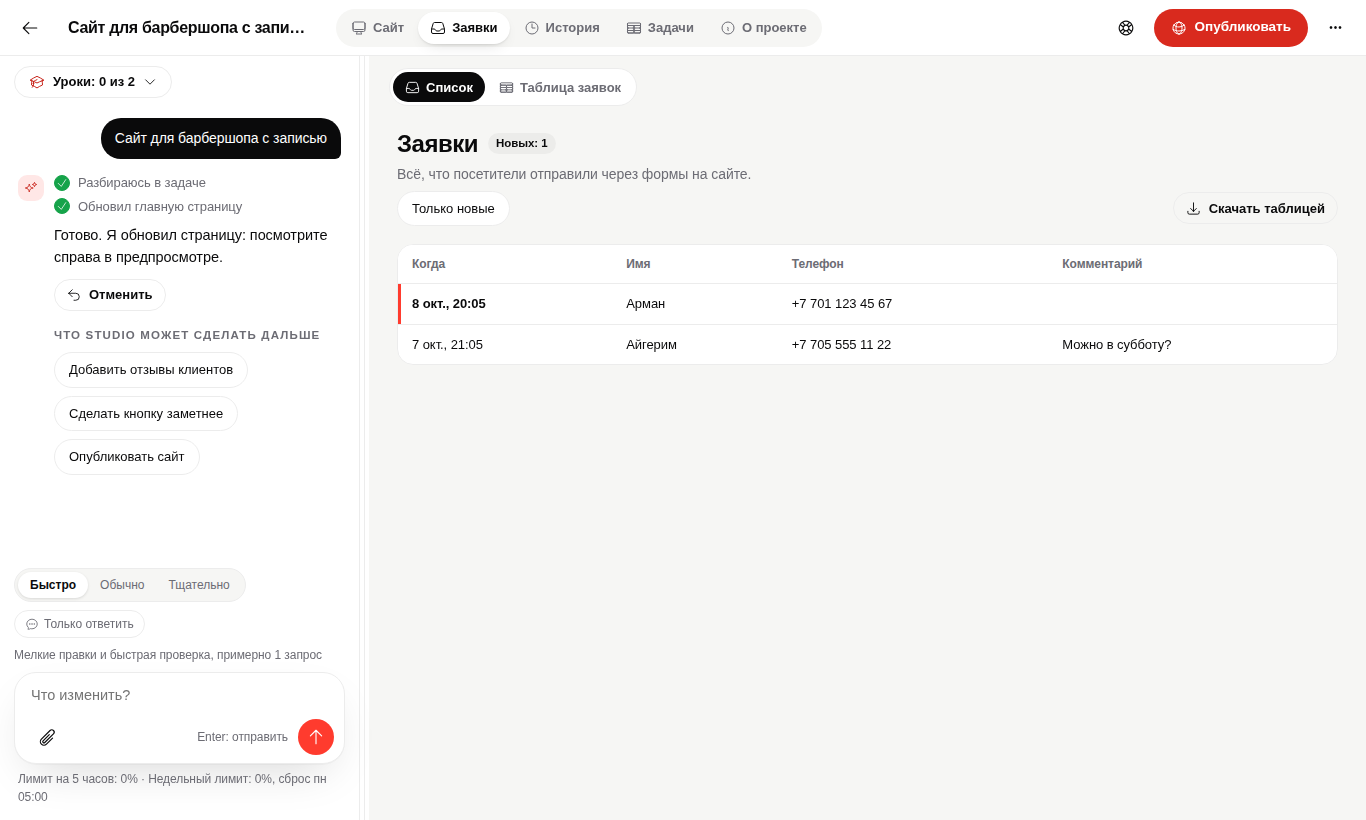
3. Find the new record in Studio
Open the project leads section. The new record should be distinct from demo leads and contain the submitted fields.
When the lead is missing
Do not mark the test successful. Check the public address, request status and storage connection. A `DialektaiSite.submit` error must not be hidden by a local success message.
Questions
Is preview testing enough?
No. Before launch, submit from the real published address.
Can demo leads stay?
Yes, but the interface must clearly distinguish them from real records.
The lead reached Studio.
Now publish or update the working version.