Lesson 5 · project plan
Describe the outcome, not a list of technical tasks
Studio’s internal project manager turns a large idea into sequential work. When a step is complete, the AI developer receives the next one automatically.
- Windows
- Linux AppImage
- Linux .deb
- macOS coming soon
Windows 10 or later or Ubuntu 22.04 or later (64-bit). macOS coming soon. About 1 GB of free disk space.
Windows may show a SmartScreen warning: click “More info”, then “Run anyway”.
Updated: . Checked in Studio 0.11.4.
1. Say what should be true at the end
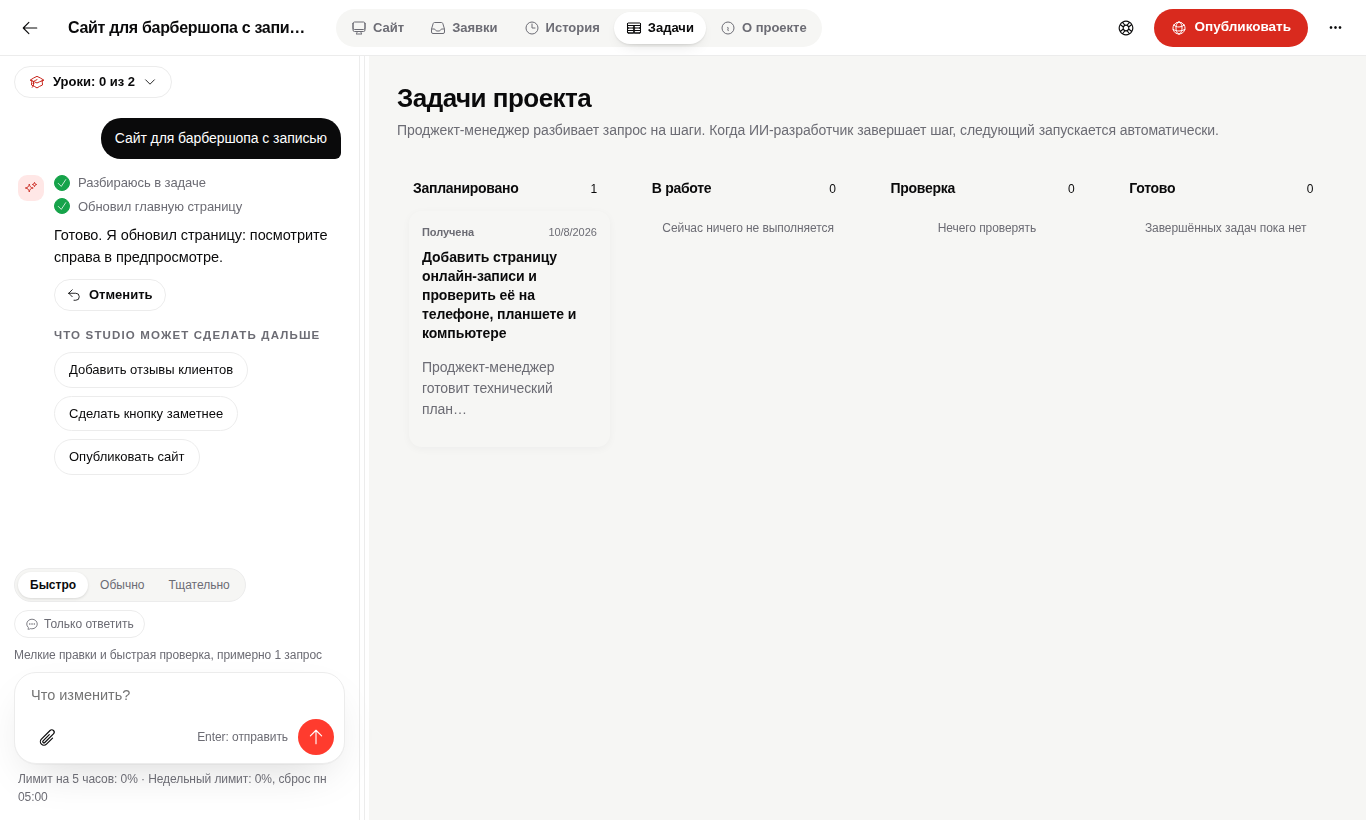
For example: "Add an online booking page and check it on phone, tablet and desktop." You do not need to ask for files, APIs or tests separately.
2. Open Tasks
The board has Planned, In progress, Review and Done columns. Studio creates the cards, not the user.
3. Do not hand off every next step
After completion Studio starts the next ready task. It asks you only for a product decision, external access or a risky action.
When the board is empty
Do not create technical cards yourself. Check that the request appeared in chat. If it disappeared without a new turn, restart Studio and open the project so the unfinished turn can recover.
Questions
Do I need project management experience?
No. Studio creates the technical plan from your description.
Can I stop the work?
Yes. Studio preserves the project and completed changes, then continues from the unfinished step.
Give Studio the whole outcome.
It will break the work down and move it forward.